Harmony-aware EQ

Your EQ, but it hears the chord.

Attune Engine estimates the chord from the audio you send it and shapes the sound around that chord. Focus lifts the notes that belong to the chord. Protect eases back the notes that fall outside it. No MIDI routing. AU, VST3 and AAX for macOS.

€ 29
Single license · Up to 3 activations
Excl. VAT

Launch price until 30 November. €39 from 1 December.

For desktop use. Install on your Mac.

AU VST3 AAX macOS 11+ v1.0.0
Attune Engine plugin interface

What is Attune Engine?

Most EQs treat every note the same, whatever chord is playing. Attune Engine pays attention to the harmony. Insert it on keys, guitars, pads, vocal stacks or a whole mix, and it estimates the chord from the audio itself. From there you choose what you want: bring the chord forward, or clear space around it.

It hears the chord

Attune Engine estimates the current chord from the audio you send it. It needs no MIDI and no setup. It works best on material with clear harmony.

Focus or Protect

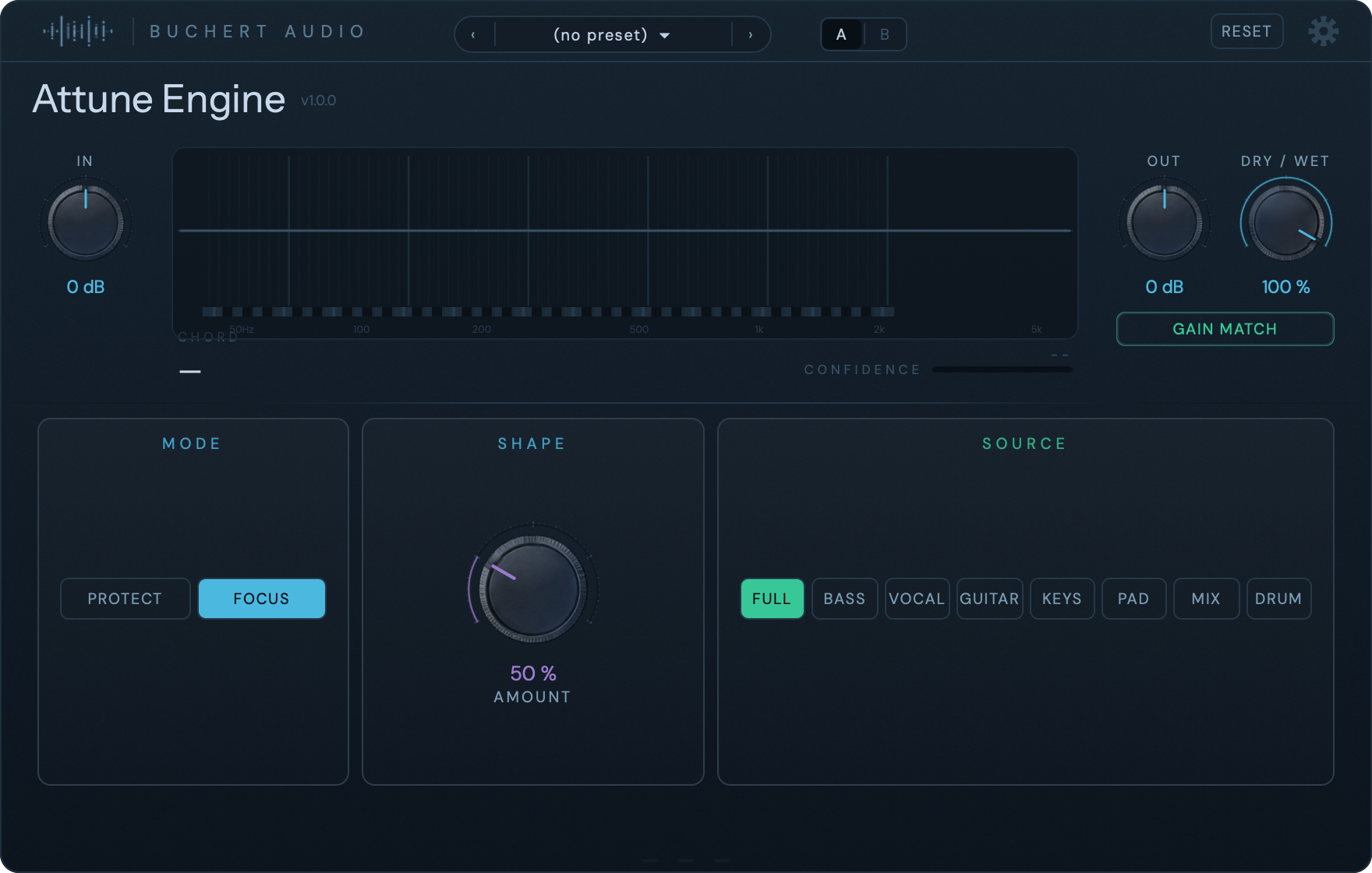
Focus lifts the notes that belong to the current chord, so the parts doing the harmonic work read clearly. Protect eases back the notes that fall outside it. Amount sets how far you go.

Tell it what you are processing

Source tells Attune Engine what you are processing: Full, Bass, Vocal, Guitar, Keys, Pad, Mix or Drum.

When you reach for it

  • A pad and a guitar sit in the same register, and the chord keeps moving.
  • A vocal stack needs its harmony to read, without a static boost that only fits one chord.
  • A full mix feels cluttered, and you want a light touch across the whole progression.

The interface

Attune Engine plugin interface

Source, Mode, Amount, In, Out, Dry / Wet and Gain Match are all in one view. Pick a factory preset, choose Focus or Protect, and raise Amount until the chord reads the way you want.

Technical Details

Plugin format macOS: AU + VST3 + AAX
Platform macOS 11.0+ (Big Sur)
Harmony input Detected from the audio, no MIDI needed
Modes Focus / Protect
Controls Source, Mode, Amount
Level In, Out and Dry / Wet, with Gain Match
Version 1.0.0

What's new

DAW Support

Logic Pro
Pro Tools

Good to know

Do I need to route MIDI?

No. Attune Engine estimates the chord from your audio. Insert it like any other effect.

What if it picks the wrong chord?

It works best on material with clear harmony. If a part is too ambiguous, lower Amount for that part.

Does it change the level of my track?

It can. Check the level when you compare with the plugin bypassed, and use In and Out to trim it.

Does it work on a full mix, or only on single tracks?

Both. On a full mix, keep Amount low for a light touch across the whole progression.

Attune Engine

Activate once, keep access. Permanent license on up to 3 machines. No iLok, no dongle, no subscription.

Standard license
€29 excl. VAT
Up to 3 activations
Buy Attune Engine for €29 Download free demo

Free demo before you buy · Minor updates within the same major version included · No iLok, no dongle

Authorization
One-time online activation
Delivery
Instant download
Updates
Minor updates within the same major version

Complete your suite

Explore the other Buchert Audio plugins.

View Tonality EQ View Warmth Engine View Dimension Engine